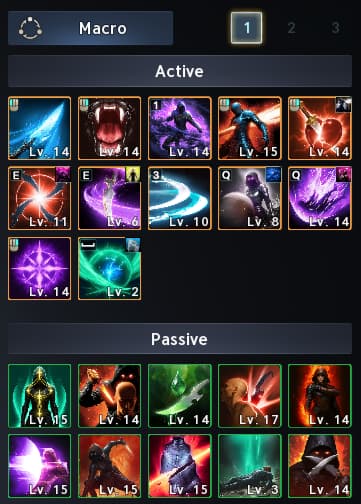
This Aion 2Assassin Burst PvE Build focuses on pumping out massive burst damage with critical hits and Insignia burst combos.
This guide will cover Skill priorities (Active, Passive & Stigmas), combat rotation and best practices. We'll also go through setting up specifics with macros for the Assassin, as the right macro build will boost your damage numbers astronomically.
If you are still getting familiar with the game’s systems, our Aion 2 beginner guide covers the early steps that help you get started.
Unlike some builds that revolve around 1-2 skills, your main damage as an Assassin comes from these four: Heart Gore, Insignia Explosion, Quick Slice, and Savage Roar.
You'll want to prioritize these before spending points or resources on other skills. An ideal order for levelling your skills would be as follows:
Heart Gore
Insignia Explosion
Quick Slice
Savage Roar
Shadowstrike
Flash Slice
Infiltrate
Storm Rampage
Any extra points can be spent how you would like!
Active Skills
Heart Gore [1/4/5]
Heart Gore is a triggered ability that triggers when landing a Critical Hit. It deals massive AoE damage to up to 4 enemies within 4m, and also restores Mana. This will be a critical skill to keep on your macro, as it will be triggered every time you perform a Critical Hit.
Specialties: Picking option 1 will help you stay healthier during fights, as it allows you to absorb a percentage of HP on hit. Option 4 gives you Multi-Hit on hit.
Getting Heart Gore to level 16 is paramount to upping your DPS, as it unlocks the cooldown-reset Specialty, which removes the cooldown from the Skill when you land a Critical Hit.
Insignia Explosion [3/5]
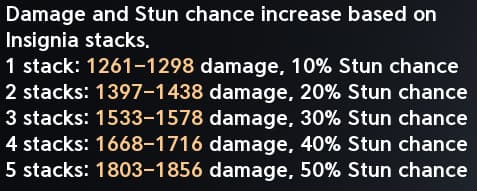
Insignia Explosion does damage to up to 4 enemies within 4m, scaling with the amount of Insignia stacks. It also inflicts Stun for a duration.
For non-NPC characters, the Stun percentage chance scales with Insignia stacks as well. (Damage numbers scale with skill level.)
Specialties: Option 3 is needed for your Specialties, as it helps keep 2 of your Insignia stacks on the target after use, which allows you to keep your damage numbers higher. Then, when able, choose option 5 for a cooldown reduction on the skill.
Quick Slice [4/5]
Quick Slice is your standard auto attack skill. This is used to keep your mana levels healthy, which fuels your core rotation.
Specialties: For Specialties, you'll want to pick options 2 and 4 at first. Option 2 absorbs HP and is a good way to keep you healthy. Option 4 gives you cooldown reduction on-hit for Insignia Explosion, allowing you to trigger it more often.
Once you hit level 16, you'll want to swap to 4 and 5, as option 5 ignores Block and Evasion, and causes Quick Slice to land as a Critical Hit, allowing all of your Critical Hit triggers to proc more often.
Savage Roar [2/4]
Savage Roar is your standard Mana-spending attack, used to deal AoE damage to up to 4 enemies in front of you, and also engraves 1 Insignia stack for 10 seconds. This skill will also be used in your macro, as it will be used to keep up your Insignias.
Specialties: You'll want to pick option 2 for a percentage buff to your Skill Speed. Then, at level 12, you can add option 4 to gain cooldown reduction on-hit for Shadowstrike, which will allow you to reposition better more often.
Shadowstrike [2/3]
Shadowstrike is your key movement skill. It allows you to move behind a target within 20m, deal damage, rotate, and stun the target for a duration. This is your go-to move to position yourself behind the target or reposition yourself in a boss fight.
Specialties: Option 2 is the first Specialty to add because it gives you a Critical Damage Boost percentage for a duration on hit. Then add option 3 for a 50% chance to inflict Seal on hit.
Flash Slice [2/4]
Flash Slice is another movement skill to help you reposition. It moves you to the opposite side of a target within 4m and deals AoE damage to up to 4 enemies, with a percent chance to inflict Blind for 3s. This is another helpful skill for when you need to reposition.
Specialties: Grabbing option 2 gives you extra range on the skill, allowing you to gap-close on targets more easily, while option 4 grants an additional use of the skill, further allowing the ability to reposition when needed.
Infiltrate [1/2]
Infiltrate is another movement skill; only this one is triggered after using Dodge or while flying. It deals damage to the target with a chance to inflict Blind.
Specialties: Once able, put on option 2 to give yourself 10m extra range on the skill. Option 1 restores Stamina on landing the skill, allowing you to use this for an emergency reposition skill during boss fights.
Storm Rampage [4/5]
Storm Rampage is your standard Stagger trigger attack. Most builds don't focus this, as it doesn't provide as much utility for other classes, but for the Assassin, the final Specialty makes this very beneficial for the Assassin's DPS.
Specialties: Option 4 allows Multi-Hit on hit, then as soon as possible (level 16), adding option 5, which gives you -1 second to all skill cooldowns on hit. This Specialty is extremely important to pumping out insane damage numbers.
Passive Priorities
For Passive skills, the main skills you want to focus on are Exploit Weakness, Rear Smite, and Assault Stance, as these will give you the best damage bonuses for this build. Afterwards, you'll want to focus on other Passives that buff your damage output further.
Exploit Weakness
Rear Smite
Assault Stance
Impact Hit (Assassin)
Determination
Apply Poison
Feel free to use any additional points you have left afterward, however you choose.
Recommended Stigmas
For this build for the Assassin, you'll want to make sure the four stigmas you focus on are:
Illusive Clone
Illusive Clone is an important Stigma, as it removes the cooldown for Heart Gore for its duration.
At later levels (level 10), it also grants a Critical Damage Boost for the duration, making your crits hit even harder.
This skill will also be part of your macro, allowing you to have it up whenever possible.
Swift Contract
Swift Contract is another skill that will be part of the macro, which grants a percent increase to your Combat Speed for the duration.
At level 10, it also boosts the effect of Rear Smite for the duration.
Level 15 additionally buffs Assault Stance's effect while it's active.
Savage Fang
Savage Fang deals massive AoE damage to up to 4 enemies, and it also engraves 5 Insignia stacks for 10 seconds. This is exceptionally helpful for maxing out your Insignia stacks and dealing huge amounts of burst damage with Insignia Explosion.
This skill also deals huge Stagger Gauge Damage to the target, so this can be very helpful in aiding your team during boss fights with Stagger mechanics.
Fourth Stigma
The fourth Stigma slot for the Assassin can be flexed into whatever option you feel comfortable using. Most players seem to use Triniel's Dagger for their fourth Stigma, but there have also been builds that feature Evasion Stance or other more defensive Stigmas.
This build will focus on using Triniel's Dagger for the fourth Stigma slot.
Triniel's Dagger
Triniel's Dagger deals damage to a target and increases all skill cooldowns of that target by a percentage of the skill's duration. Additionally, this skill's damage is increased by a percentage if you are attacking from behind.
At level 10, this skill also grants you -10% to all skill cooldowns on hit, allowing you to dish out more damage faster.
Assassin Combat Rotation
The Assassin's combat rotation revolves around positioning, as this class's damage revolves around attacking from behind. Once you're able to manage your positioning well, the macro will help
Damage Rotation
A basic example of your rotation should be as follows:
Activate your Swift Contract and Illusive Clone buffs.
Use Shadowstrike to gain your Critical Damage Boost and reposition yourself behind the enemy.
Use Savage Fang to stack your Insignias.
Use Triniel's Dagger (if you are running it and it's at level 10) to cut your cooldowns.
Use your macro, which will rotate between Heart Gore, Insignia Explosion, and Savage Roar.
Remember, you can always use your other movement abilities like Infiltrate and Flash Slice to reposition yourself behind the boss.
In-Game Macro Setup
The in-game macro system is a simpler way to handle much of the basic rotation, so you don’t have to worry about activating your skills in a specific order at the perfect moment.
Check both your macro and quick-slot assignments when setting it up. Your damage skills, buffs, and conditional attacks still need the correct bindings; assigning a macro key alone does not configure the full rotation. Test the setup on a training dummy before taking it into a dungeon. Watch to ensure your attacks activate correctly and your debuffs are applied as intended.
For targeting, boss orientation indicators, and other useful control options, check our Aion 2 settings guide.
The macro relies more on your quick-slot assignments and key-bindings than it does on a specific rotation of skills to cycle through. Below is one example of how you will want to configure your key-bindings to allow an optimal casting order.
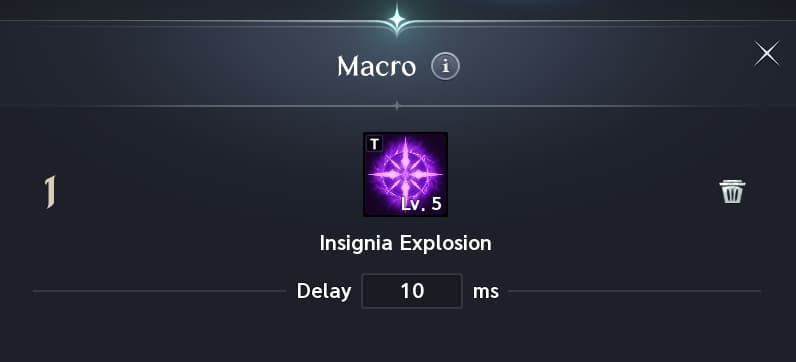
Set your macro key to your right-click and set up your Skills on that hotkey in the order of:
0 - Insignia Explosion
1 - Heart Gore
2 - Ambush (This slot can also be left empty if you are not running Ambush.)
3 - Savage Roar
This macro allows a couple of things: It allows Insignia Explosion to be cast as soon as it's off cooldown, and it allows Heart Gore to be cast any time it is triggered over your other right-click skill, Savage Roar (And Ambush if you are running it).
Using this macro setup will allow you to hold down your left and right-click mouse buttons, seamlessly weaving your Quick Slice attacks in with your Savage Roar attacks, while being able to activate Insignia Explosion and Heart Gore whenever they are able to be cast.
Additional Macro Setup
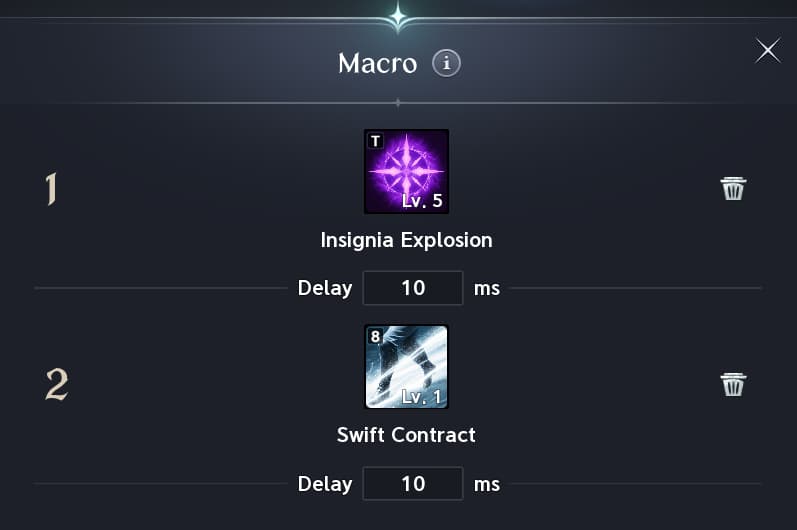
There are some macros that will add your buffs (Swift Contract and Illusive Clone) to the macro setup. (As seen below.) It is up to your personal playstyle how you'd like to run the macro. The one above focuses more on your damage output, while allowing you to choose when to apply your combat buffs.
There is no right answer to how you want to set up your macro for this. Choose whichever option suits your playstyle best.
Daevanion Board Priorities
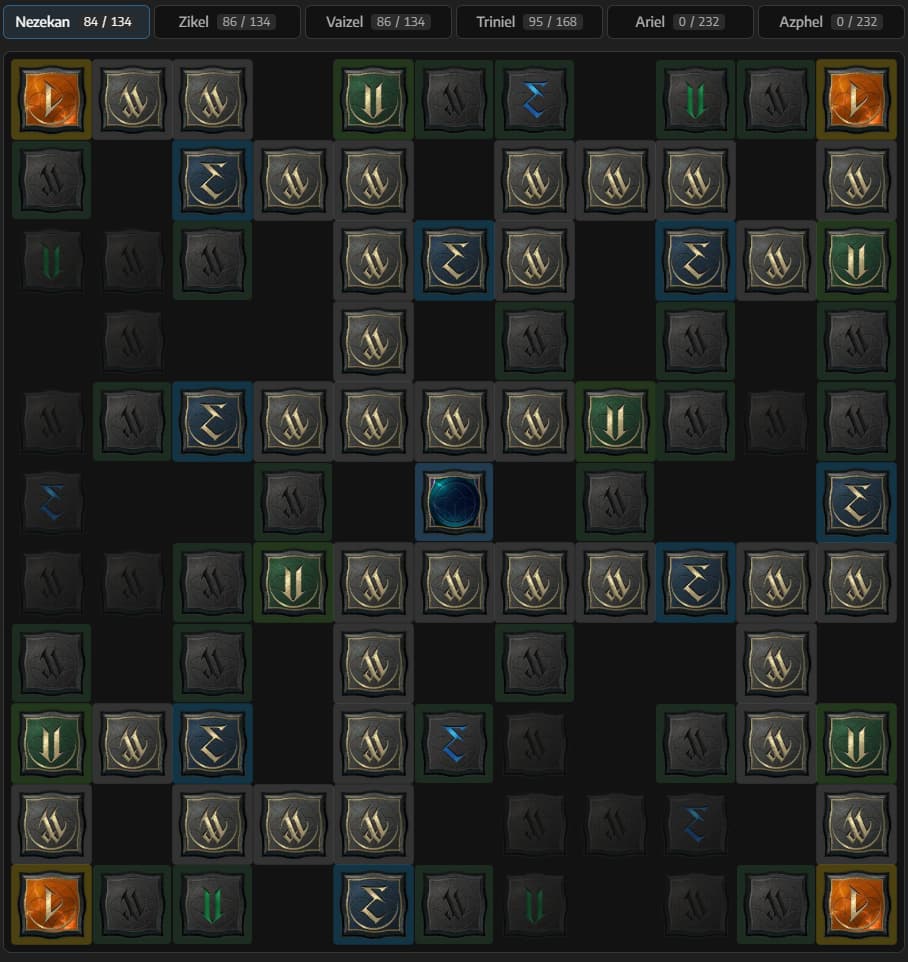
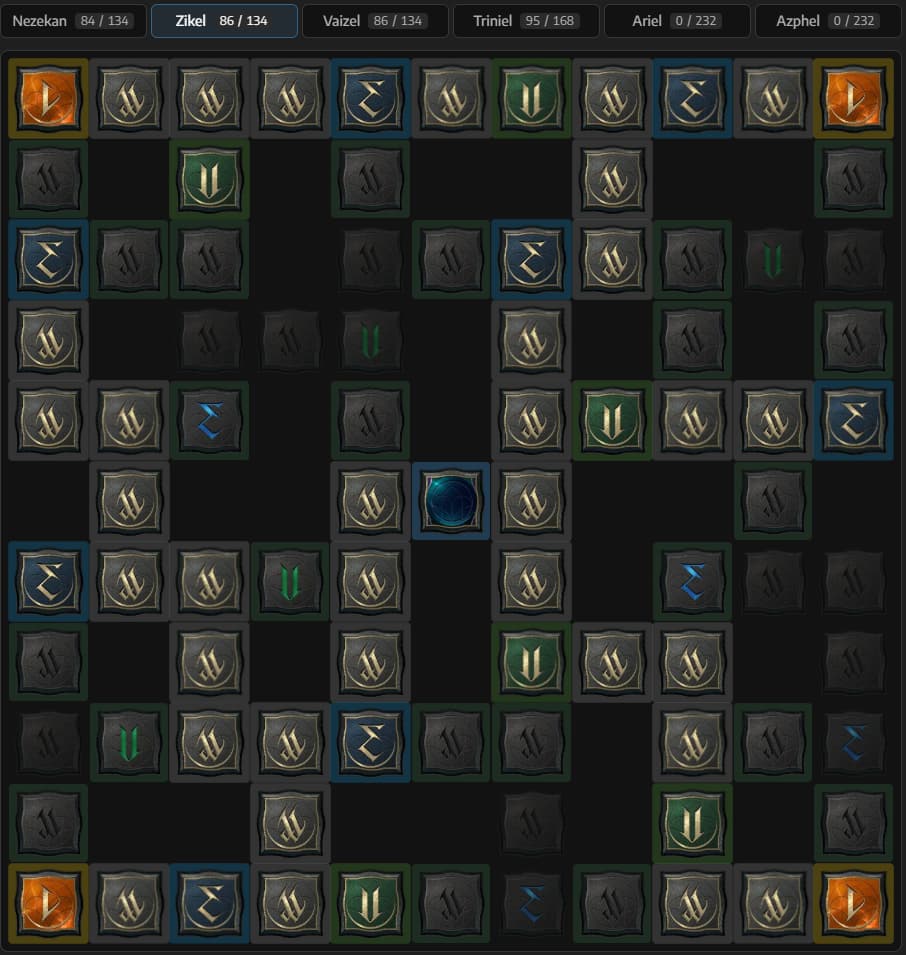
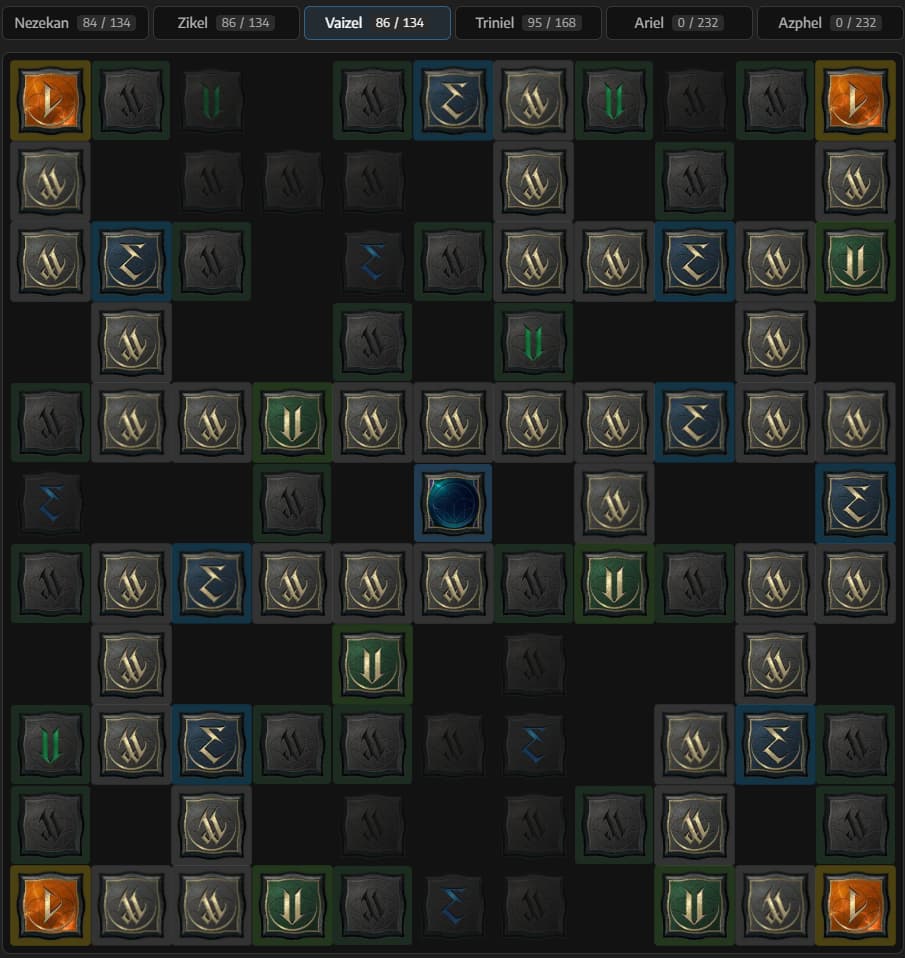
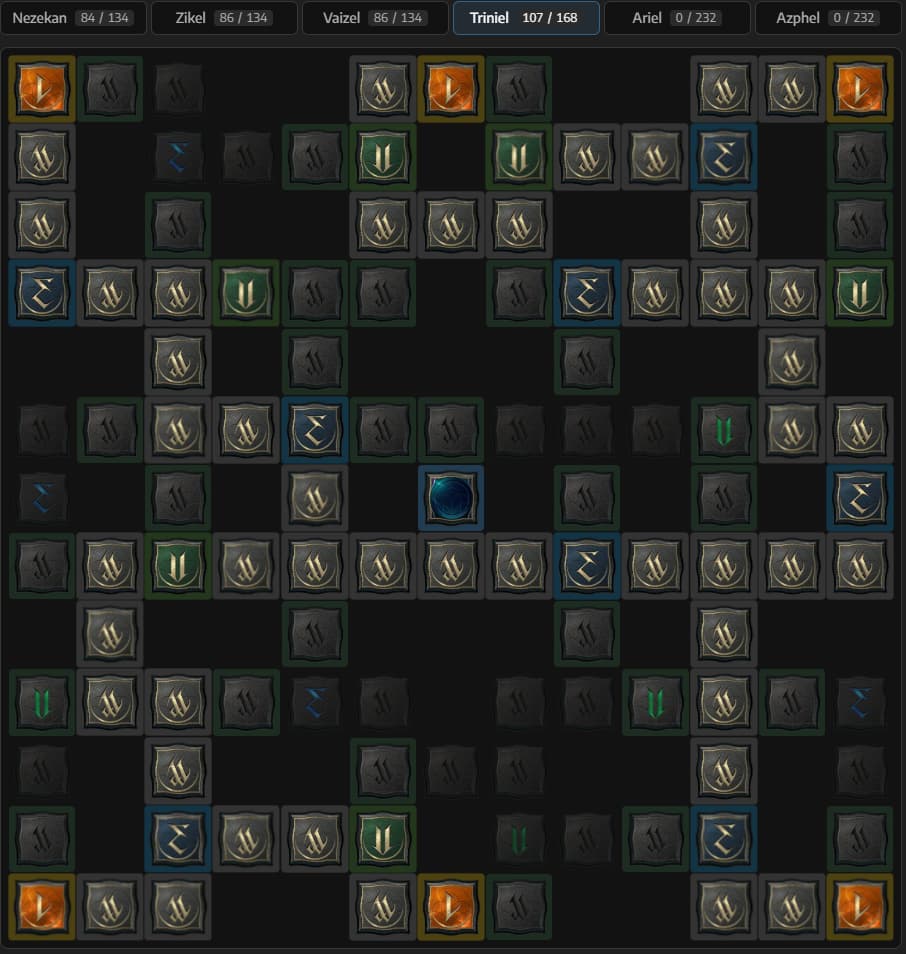
For your Daevanion Board, start with nodes that prioritize Heart Gore and Insignia Explosion. Remember, the faster you can get Heart Gore to Level 20, the faster you can gain the Specialty that removes the cooldown on Critical Hit.
Once you’ve acquired the important nodes and begin needing to fill out your board, you can use these examples for paths to follow:
Keep in mind, the Daevanion Boards are designed to eventually be entirely filled out.
Nezekan Example
Zikel Example
Vaizel Example
Triniel Example
Additional Tips
This build is designed around the core mechanic of your Insignias, allowing you to perform massive bursts of damage to any enemy.
Focus on your Positioning Because the macro will do most of your skill rotation for you, it's important that you focus on your positioning in fights. Assassins need to be attacking from behind their target to deal the most damage and to trigger some of their additional abilities.
Change your In-Game Settings! Following the last tip, something that will help a lot with your positioning is turning on the Orientation Indicator setting in your Options.
Go to Options > Info Display > Combat. There you should see the Display Boss Orientation Indicator option. Set that to BACK, and you will get a visual indicator on boss monsters indicating their "back" side.
Master the "Dual" Mouse Technique When playing this build and utilizing your macro, you will not want to just be "tapping" your right-click. Holding down your left and right mouse buttons simultaneously when in range will optimize your damage output.


 Assassin Burst PvE Build focuses on pumping out massive burst damage with critical hits and Insignia burst combos.