
menu
MobalyticsUse your favourite features in-game with our Desktop App
Gamebase Guide

RuneScape Dragonwilds 1:0 Crossplay and How to Play with Friends

By Oli
Updated on Sep 15, 2026
Sep 15, 2026

Overview

RuneScape Dragonwilds crossplay lets players on PC, PS5, Xbox Series X|S and Nintendo Switch 2 explore together in the 1.0 update. To join friends across platforms, the host enables crossplay when loading a multiplayer world, then shares the invite code from the pause menu.

If your group is starting fresh, our RuneScape Dragonwilds beginner guide covers preparing for your first adventures.
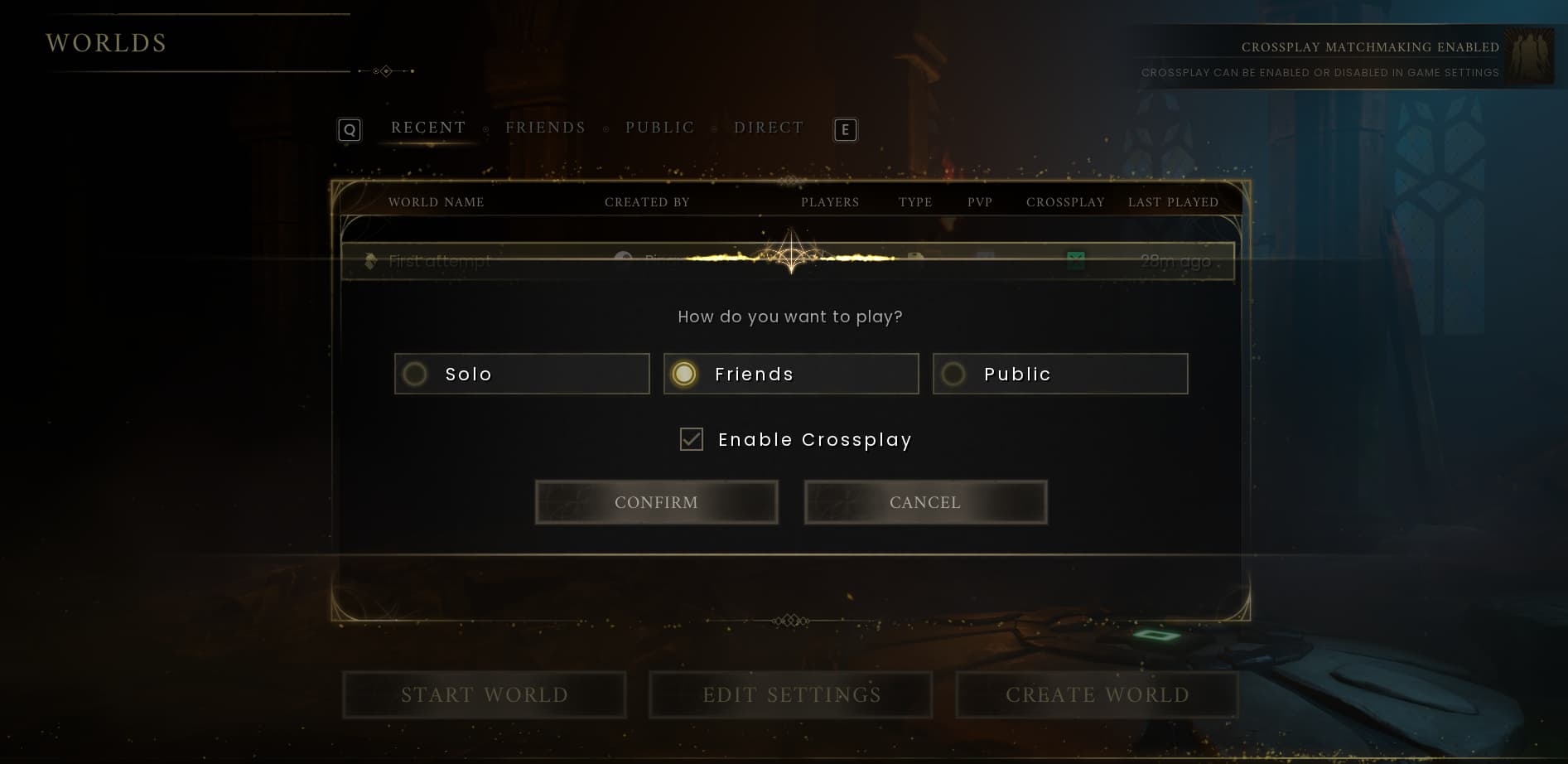

How to Enable Crossplay

Enable crossplay when loading the world you want to host for multiplayer.

  1. Choose the world your group will use.
  2. Turn on its crossplay option when loading it for multiplayer.
  3. Enter the world and open the pause menu to find the invite code.

The host can choose whether to enable crossplay each time they host. Crossplay worlds also appear in the world browser.

How to Join Friends with an Invite Code

Enter your friend’s invite code on the world browser screen to join their world.

  1. Ask the host for the code displayed in their in-game pause menu.
  2. Open the world browser and enter that code.
  3. Follow the on-screen prompts to join.

Crossplay on Dedicated Servers

Dedicated servers also have a crossplay option. If your group uses one, ask the person managing it to check that crossplay is enabled before players on other platforms try to connect.

What to Check If You Cannot Join

Start by checking the host’s crossplay setting and the invite code you entered. Then work through these basic checks:

  • Confirm that the host has loaded the intended multiplayer world.
  • Compare your entered code with the one currently shown in the host’s pause menu.
  • Check that everyone has installed the latest available game update.
  • Read any error message before trying again so you can identify what failed.

These are starting checks rather than a fix for every connection problem. If joining still fails, keep the error message and note which platforms your group is using when seeking support.

Getting Started Together

Once everyone has joined, choose a meeting point and decide where to establish your first base. Our RuneScape Dragonwilds building guide explains how to plan a practical shelter with space for crafting and storage.

Before heading out, make sure everyone has food and usable equipment. Our RuneScape Dragonwilds crafting stations guide covers the stations used to make equipment and prepare upgrades.

Table of Contents

See More

How to Fast Travel in RuneScape Dragonwilds 1.0
Updated on Sep 15, 2026
RuneScape Dragonwilds 1.0: Crafting Stations Guide
Updated on Sep 15, 2026
RuneScape Dragonwilds 1.0: Beginner’s Guide
Updated on Sep 15, 2026
RuneScape Dragonwilds 1.0 Guide: New Features and Tips
Updated on Sep 15, 2026
RuneScape Dragonwilds 1:0 Crossplay and How to Play with Friends
Updated on Sep 15, 2026

Like our guides?

Add Mobalytics as a preferred source on Google!