Valheim gives you a surprising amount of control over how your world plays. Before starting a new world, or by changing the settings of an existing one, you can adjust everything from combat difficulty and resource rates to raids, death penalties, portal restrictions, and building rules.
These settings can make the game more relaxed, more punishing, or simply reduce parts of the grind that you personally don't enjoy. They are especially useful if you're playing solo, setting up a co-op world, or returning to Valheim and want a different experience from the default settings.
In this guide, we'll go over the available world settings and presets, explain what each one changes, and give some recommendations for which settings may fit different types of players.
There is no single "correct" way to configure a world. Valheim is designed to let you shape the experience around the way you want to play, whether that means sticking with the default rules or changing several modifiers to better fit your playstyle.
How to Change World Settings
You can change your world settings from the world selection menu before loading into Valheim.
Select the world you want to play on, then open the World Modifiers or world settings menu. From there, you can either choose one of the available presets or manually adjust individual settings such as combat difficulty, resource rates, raids, death penalties, and portal restrictions.
You do not need to create a completely new world just to change most of these settings. Existing worlds can also be adjusted, which makes it easy to increase or reduce the difficulty later if your current setup no longer feels right.
If you're playing on a multiplayer or dedicated server, the available settings are determined by the server configuration. In that case, the server owner or administrator usually controls the active world modifiers.
After changing the settings, make sure the correct configuration is selected before launching the world.
Tip: If you're unsure what to change, start with the Normal preset and adjust one or two settings at a time. That makes it much easier to understand how each modifier affects your playthrough.
World Presets Explained
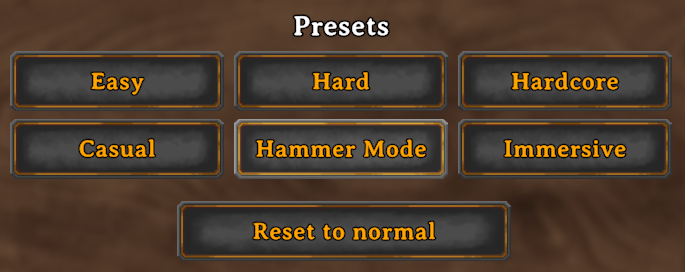
Valheim includes several World Presets that automatically adjust multiple modifiers at once. These are useful if you want to quickly change the overall experience without configuring every setting individually.
You can still fine-tune individual modifiers afterward, so think of the presets as a starting point rather than a permanent choice.
Normal
Normal is the standard Valheim experience and the best option for most first-time players.
Combat, resource gathering, raids, death penalties, and Portal restrictions all use the intended default settings. If you're unsure which preset to choose, start here.
Casual
Casual makes Valheim much more forgiving.
It reduces the overall pressure of survival and is a good option for players who primarily want to focus on exploration, building, and progression without being punished as heavily for mistakes.
This can also work well for relaxed co-op worlds where the group cares more about playing together than maintaining the default difficulty.
Easy
Easy keeps the standard progression structure but reduces some of the difficulty.
It's a good middle ground if Normal feels slightly too punishing, but you still want combat and survival mechanics to matter.
For players completely new to survival games, this can be a comfortable place to start.
Hard
Hard increases the challenge without completely changing the way Valheim is played.
Enemies become more dangerous, and mistakes are more punishing, making preparation, good food, upgraded equipment, and combat mechanics such as parrying much more important.
This is a better option for players who already understand Valheim's progression and want a tougher second playthrough.
Hardcore
Hardcore is designed for players looking for a much more punishing experience.
The preset combines tougher combat with harsher consequences for dying, meaning poor preparation or a failed corpse run can have a much larger impact on your character.
This is generally not something I would recommend for a first playthrough.
Immersive
Immersive focuses more heavily on exploration and navigation.
It removes or limits some of the conveniences that normally help you move around the world, creating a more traditional survival experience where paying attention to landmarks and your surroundings becomes much more important.
This preset is better suited to experienced players who already understand how Valheim's world and biome progression work.
Hammer
Hammer Mode is primarily intended for players who want to focus on building and experimentation.
It removes many of the normal restrictions associated with construction, allowing you to build much more freely without needing to gather resources in the usual way.
This is ideal for testing building ideas, creating large settlements, or simply treating Valheim more like a sandbox.
For a normal progression playthrough, however, you will usually want to use one of the other presets instead.
Which Preset Should You Choose?
For most new players, Normal is the easiest recommendation because it lets you experience Valheim as originally intended.
If you mainly care about building or relaxed exploration, Casual or Hammer may fit better. If you've already completed the game and want a tougher run, Hard or Hardcore can make progression feel much more demanding.
The important thing is that the preset only determines your starting configuration. You can still adjust individual World Modifiers afterward to create a setup that better matches how you want to play.
Combat Difficulty
The Combat Difficulty setting changes how dangerous enemies are in your world. It mainly affects how much damage enemies deal and how punishing mistakes become during fights.
The available settings range from Very Easy to Very Hard, with Normal representing the default experience.
Very Easy
Enemies deal much less damage, making combat far more forgiving.
This is useful for players who mainly want to focus on exploration, building, or progression without having to spend as much time learning enemy attack patterns.
Easy
Easy lowers the overall combat pressure while still keeping enemies relevant.
You can afford to make more mistakes, but food, armor, shields, and weapon upgrades still matter.
Normal
Normal is the standard Valheim combat setting.
Enemies deal the intended amount of damage, and preparation remains important without making every encounter overly punishing.
This is the best choice for most first-time players.
Hard
Hard makes enemies noticeably more dangerous.
Poor food, outdated armor, or badly timed blocks become much more punishing, and stronger enemies can quickly overwhelm you if you get surrounded.
This setting is better suited to players who already understand Valheim's combat and progression systems.
Very Hard
Very Hard is the most punishing standard combat option.
Enemies hit extremely hard, which makes parrying, positioning, Stamina management, resistances, and proper preparation much more important.
At this difficulty, entering a new biome undergeared can become dangerous very quickly.
Which Combat Difficulty Should You Use?
For a first playthrough, Normal is the safest recommendation.
If you enjoy the rest of Valheim but find combat frustrating, lowering it to Easy is a simple way to make the game more relaxed without changing the rest of your world.
If you've already completed Valheim and want enemies to remain threatening even with good equipment, Hard or Very Hard can make a second playthrough much more demanding.
Changing Combat Difficulty does not require you to adjust your other World Modifiers, so you can make enemies harder while still keeping normal resource rates, raids, and death penalties.
Death Penalty
The Death Penalty setting controls how punishing it is when your character dies. This mainly affects how much skill progress you lose and how much of a setback death becomes during exploration or difficult boss fights.
The available options range from Casual to Hardcore, with Normal being the default experience.
Casual
Casual makes death much less punishing.
This is a good option if you want to explore dangerous areas without worrying too much about losing progression every time something goes wrong.
It works especially well for relaxed co-op worlds or players who enjoy Valheim's building and exploration more than its survival penalties.
Very Easy
Very Easy still gives death some consequences, but reduces the overall penalty considerably.
You will still want to avoid dying, but a failed boss attempt or corpse run will not set your character back as much as it would on Normal.
Easy
Easy slightly reduces the punishment compared to the default setting.
This is a useful middle ground if you want death to matter without making repeated deaths overly frustrating.
Normal
Normal uses Valheim's standard death rules.
Dying causes skill loss and leaves your equipment behind, meaning you will usually need to make a corpse run to recover it.
For most players, this is the best starting point because death remains meaningful without becoming excessively punishing.
Hard
Hard increases the consequences of dying.
Poor preparation becomes much more costly, especially if you die repeatedly while trying to recover your equipment from a dangerous biome.
This setting works best for players who already understand Valheim's combat and know how to prepare backup food, equipment, and Portals for corpse runs.
Hardcore
Hardcore makes death extremely punishing and is intended for players looking for a serious survival challenge.
A mistake can have a much larger effect on your character progression, which makes preparation and avoiding unnecessary risks significantly more important.
For a first playthrough, this setting is generally not recommended.
Which Death Penalty Should You Use?
For most players, Normal is the best choice.
If you dislike losing skill progress or find corpse runs frustrating, lowering the Death Penalty can make the game much more enjoyable without changing enemy difficulty.
On the other hand, experienced players who want death to carry more weight can increase it independently of Combat Difficulty. This means you can, for example, keep enemies at Normal strength while making the consequences of dying much harsher.
Resource Rate
The Resource Rate setting controls how many resources you receive from gathering, mining, chopping trees, and other similar activities.
This is one of the easiest settings to change if you enjoy Valheim's progression but find the gathering grind too slow. Increasing the resource rate does not make enemies weaker or bosses easier. It mainly reduces the amount of time you need to spend collecting materials.
Much Less
This greatly reduces the amount of resources you receive.
It makes progression significantly slower and is mainly suited to players who want a much harsher survival experience where every resource matters.
Less
Less lowers resource yields without making gathering as extreme as Much Less.
This can make building and crafting feel more expensive and forces you to explore more for the same amount of materials.
Normal
Normal uses the standard resource rates.
This is the intended balance for a regular playthrough and is the best starting point if you want the default Valheim experience.
More
More increases the amount of resources you receive.
This is a very useful option for solo players, since gathering everything alone can take considerably longer than it does in a group.
It speeds up mining, wood collection, farming, and general crafting progression without changing combat difficulty.
Much More
Much More increases resource gains even further.
This is a good option if you want to spend less time farming materials and more time exploring, fighting, or building.
Most
Most gives you the highest resource yield available through the standard World Modifiers.
At this setting, progression becomes much faster and large building projects become considerably easier to supply.
It is best suited to players who already know Valheim well and simply want to reduce as much gathering time as possible.
Which Resource Rate Should You Use?
For a first playthrough, Normal is still the safest recommendation.
However, increasing it slightly is one of the least disruptive ways to make Valheim more convenient. You still need to discover resources, defeat bosses, unlock crafting stations, and progress through each biome. You simply spend less time repeating the same gathering trips.
For solo players, More can be especially comfortable if Normal feels too grindy.
Raid Frequency
The Raid Frequency setting controls how often enemy raids can occur at your base.
Raids are events where groups of enemies attack your location for a short period of time. As you defeat bosses and progress through Valheim, the types of enemies that can appear during these events become more dangerous.
Changing this setting does not directly make enemies stronger or weaker. It only changes how often raids are allowed to happen.
None
This disables raids entirely.
It is a good option if you mainly enjoy building, farming, and exploration and do not want your base to be attacked while you are working on it.
This can also be useful for large building projects where a raid would mostly be an inconvenience rather than an interesting challenge.
Much Less
Raids can still happen, but considerably less often than normal.
This keeps the mechanic present without making attacks on your base a regular interruption.
Less
Less slightly reduces how often raids occur.
It is a good middle ground if you like defending your base but feel that the default frequency becomes annoying during longer sessions.
Normal
Normal uses the standard Valheim raid frequency.
Raids happen occasionally as you progress and encourage you to think about where and how you build your base.
For a first playthrough, this is generally the best option.
More
More increases the frequency of raids.
You will need to pay more attention to base defenses, walls, terrain, and where important crafting stations or Portals are placed.
This works well if you enjoy the base-defense side of Valheim and want enemy attacks to be a more consistent part of the game.
Much More
Much More makes raids occur very frequently.
At this setting, your base is under significantly more pressure, especially later in progression when stronger raid events become available.
This is mainly suited to experienced players who enjoy defending settlements and want base construction to have a much larger survival component.
Player-Based Raids
For multiplayer worlds, Player-Based Raids can also change how raid progression is determined.
Normally, the world can unlock new raid events as overall progression advances. With Player-Based Raids enabled, the game instead takes the progression of the players involved into account.
This can be particularly useful on shared servers where some players have progressed much further than others. It helps prevent a newer player from being hit by raid content that is far beyond their own stage of progression.
Which Raid Frequency Should You Use?
For most first-time players, Normal provides a good balance. Raids remain something you need to prepare for without constantly interrupting normal gameplay.
If you mainly want to build, lowering the frequency or disabling raids entirely can make the experience much more relaxed.
If you enjoy defending your base and want construction choices to matter more, increasing the frequency can make walls, defensive terrain, and other protections considerably more important.
Portal Settings
The Portal setting controls what you are allowed to transport through Portals and can have a surprisingly large impact on how much time you spend travelling around the world.
By default, Valheim restricts certain items, most notably ores and metals, from being transported through Portals. This means that mining trips often require you to move those resources back manually by ship or over land.
The available Portal modifiers are Casual, Normal, Hard, and Very Hard. The official server settings expose Casual, Hard, and Very Hard as modifiers around the default Normal rules.
Casual
Casual removes the normal restriction on transporting metals and ores through Portals.
This makes progression considerably faster because you can mine resources such as Copper, Iron, Silver, and Black Metal, then immediately Portal back to your main base instead of organizing a return trip.
It is a good option for players who enjoy exploration and crafting but do not enjoy repeatedly transporting heavy materials across long distances.
Normal
Normal uses the standard Portal rules.
Most items can pass through Portals, but certain resources such as ores and metals cannot. This makes ships, roads, carts, and resource outposts much more important throughout progression.
For a first playthrough, Normal gives you the intended balance between convenient fast travel and the need to properly explore and transport valuable materials.
Hard
Hard makes Portals more restrictive.
This reduces how much you can rely on fast travel and puts more emphasis on travelling through the world manually, establishing additional bases, and planning longer expeditions.
It is better suited to experienced players who want exploration and logistics to play a larger role.
Very Hard
Very Hard applies the strongest Portal restrictions.
At this setting, Portals become much less useful as a general travel solution, forcing you to rely much more heavily on ships, roads, and permanent outposts.
This can significantly increase the time and risk involved in exploration, especially once progression starts taking you to distant islands.
Which Portal Setting Should You Use?
For most first-time players, Normal is the best place to start.
If you enjoy Valheim but find transporting ore back to your base tedious, Casual is one of the most convenient modifiers you can enable. It speeds up progression without making enemies weaker or changing how resources are obtained.
Hard and Very Hard are better for players who specifically want travelling and logistics to be a larger part of the survival experience.
Changing the Portal rules can dramatically change the pace of a playthrough, so this is one of the settings worth experimenting with if you already know which parts of Valheim you enjoy most.
Additional World Modifiers
Alongside the main sliders for Combat, Death Penalty, Resources, Raids, and Portals, Valheim also includes several additional toggle-based modifiers. These can change the game quite significantly, so they are worth understanding before enabling them.
The available additional modifiers are No Build Cost, Player-Based Raids, Passive Enemies, and No Map.
No Build Cost
No Build Cost removes the normal resource cost from building, allowing you to place structures without gathering the required materials first.
This is mainly useful for players who enjoy Valheim's building system and want to experiment with large bases without spending hours collecting Wood, Stone, and other construction materials.
It can also be useful for testing designs before committing to them in a normal survival world.
Keep in mind that this changes the normal progression and resource economy quite heavily. In Valheim 1.0, Iron Gate also confirms that Hammer Mode can block certain achievements, since the game treats it as a temporary cheat-style mode.
Player-Based Raids
Player-Based Raids changes how raid progression is determined in multiplayer worlds.
Instead of simply using the overall progression of the world, the game takes the progression of the relevant players into account when deciding which raids can occur.
This can be particularly useful on servers where players progress at very different speeds. A newer player building in the Meadows is less likely to be affected by raid progression caused by another player who has already reached much later biomes.
For most solo worlds, this modifier is not particularly important.
Passive Enemies
With Passive Enemies enabled, creatures will generally not become aggressive toward you unless you attack them first.
This dramatically reduces the danger of exploration and makes Valheim much more relaxed.
It is especially useful for players who mainly want to build, explore, farm, or experience the world without constant combat. You can still fight enemies whenever you want, but you are given much more control over when those fights happen.
Because enemy aggression is such a major part of normal Valheim progression, this modifier significantly changes the survival experience.
No Map
No Map completely removes access to the normal world map.
This is one of the most significant modifiers you can enable because Valheim's world is procedurally generated and can become extremely large. Without a map, you need to navigate using landmarks, coastlines, signs, roads, the position of the sun, and your own memory.
It also means you cannot simply place map markers for Copper deposits, dungeons, bosses, Portals, or other important locations.
No Map is best suited to experienced players looking for a much more immersive exploration experience. For a first playthrough, keeping the map enabled is strongly recommended.
Which Additional Modifiers Should You Use?
For a normal first playthrough, you can simply leave all of these modifiers at their default settings.
No Build Cost is excellent for dedicated builders, while Passive Enemies can make the game much more comfortable for players who mainly want to explore and create. Player-Based Raids is particularly useful for multiplayer servers with players at different stages of progression.
No Map is the opposite. Rather than making Valheim easier, it removes one of your most important navigation tools and is better treated as an additional challenge for a later playthrough.
These modifiers can also be combined with the other World Settings, allowing you to create some very different experiences without having to rely on mods.
Customize Valheim Your Way
Valheim's World Settings give you a lot of control over how difficult, grindy, or relaxed you want your playthrough to be. Whether you want the standard survival experience, faster resource gathering, fewer raids, unrestricted Portals, or a much harsher challenge, you can adjust the world to fit the way you prefer to play.
For a first playthrough, Normal settings are still the best place to start, since they let you experience the game as intended before deciding which parts you may want to change.
Most importantly, there is no wrong way to configure your world. Use the modifiers that make Valheim more enjoyable for you, and don't be afraid to change them later if your current setup no longer feels right.