menu
MobalyticsUse your favourite features in-game with our Desktop App
Gamebase

GTA 6: Controls (Xbox Button Scheme)

Guides
GTA 6
By Jack Briggs
Updated on Nov 19, 2026
Nov 19, 2026

Overview

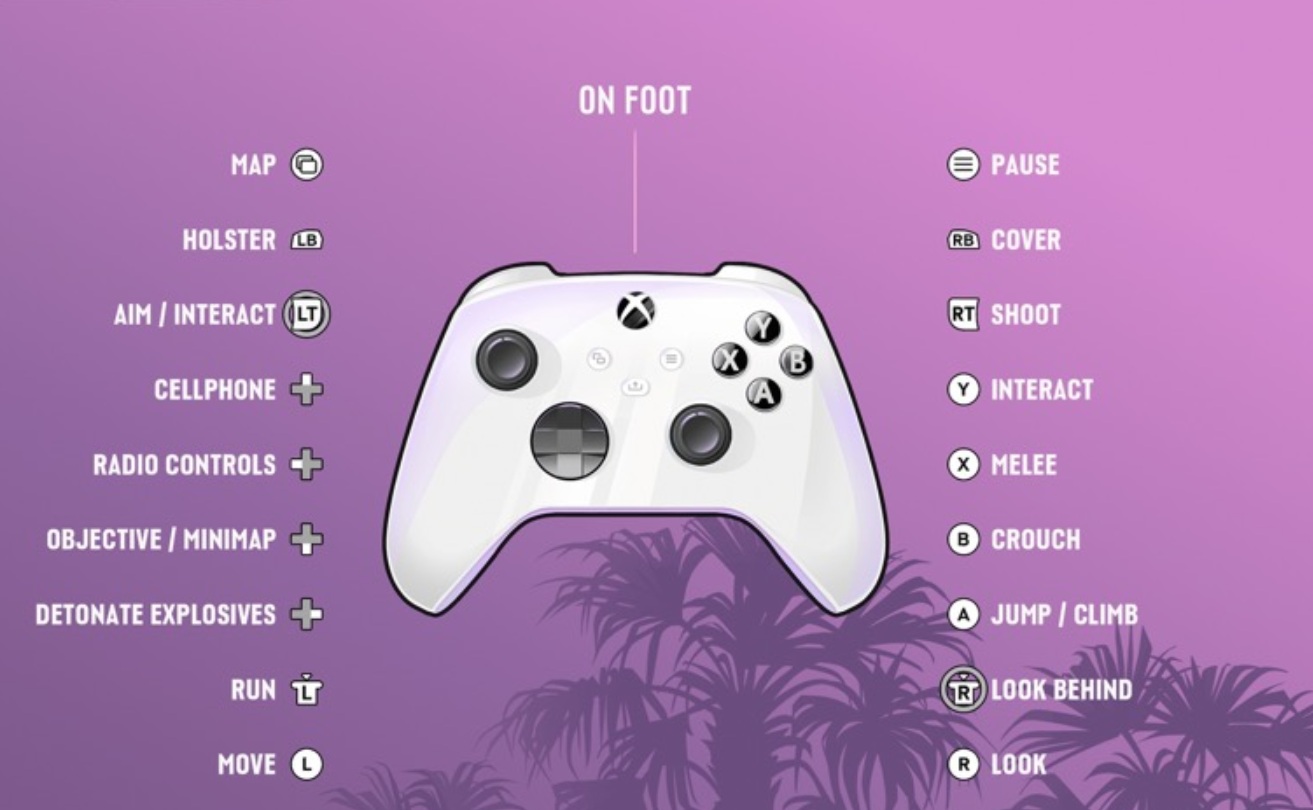
Knowing the controls is the fastest way to get comfortable in Leonida. This guide covers the default Xbox Series Controller layout for GTA 6, including the new Waink app, partner menu, and quick navigation shortcuts.

These are the default Xbox layouts for on foot, aiming, land and water vehicles, aircraft, bicycles, swimming, and parachuting. You can also enable a Classic or Left-handed layout. Button names or placements may change before or after launch, so check in-game settings for the final layout.

Now that you know the controls, check out our other GTA 6 Guides.
On-Foot Controls

GTA 6 Controls On-Foot

Button

Action

Left Stick (L)

Move

Right Stick (R)

Look

Left Stick Click (LS)

Run

[Sprint]

Right Stick Click (RS)

Look Behind

LB

[Hold]

Holster

[Weapon / Item menu]

LT

Aim / Interact

RB

Cover

RT

Shoot

A

Jump / Climb

B

[Hold]

Crouch

[Rest]

X

Melee

Y

Interact

D-Pad Up

[Hold]

Mobile Phone

[Waink App]

D-Pad Down

[Hold]

Objective / Minimap

[Quick Navigation]

D-Pad Left

[Hold]

Radio Controls

[Radio/Car Menu]

D-Pad Right

[Hold]

Detonate Explosives

[Partner Menu / Switch Character]

View

Map

Menu

Pause

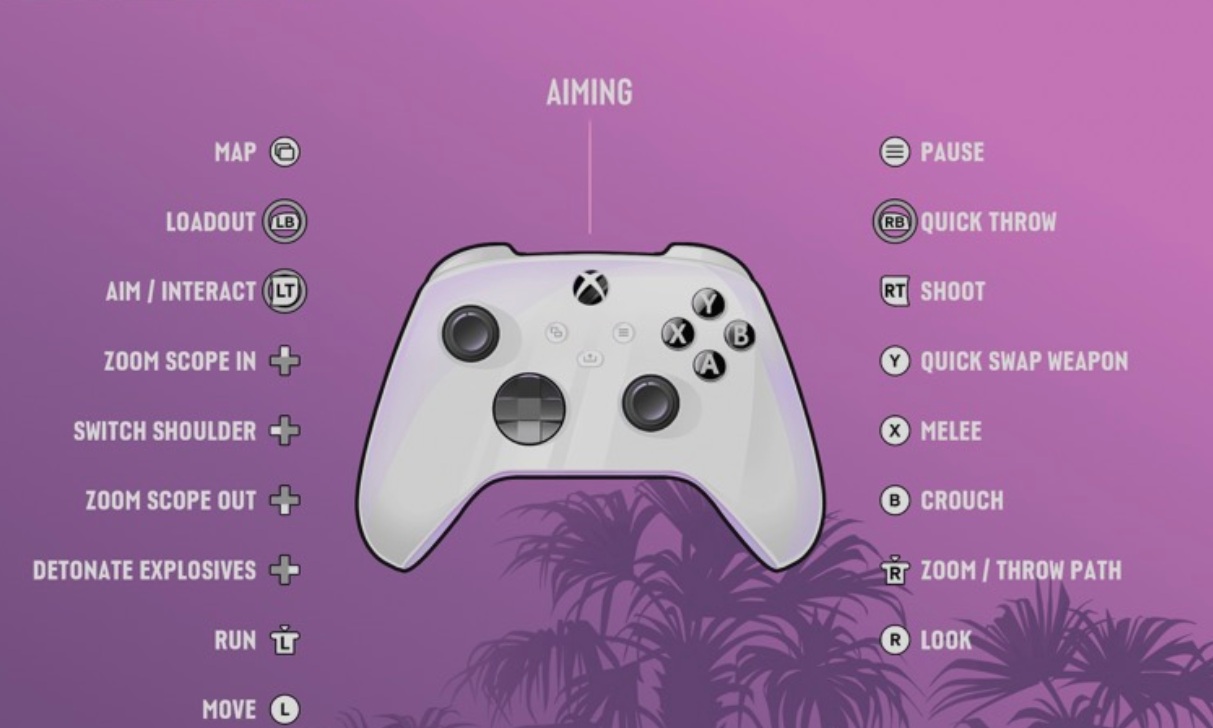
Aiming

GTA 6 Controls Aiming

Button

Action

Left Stick (L)

Move

Right Stick (R)

Look

Left Stick Click (LS)

Run

Right Stick Click (RS)

Zoom / Throw Path

LB

Holster

LT

Aim / Interact

RB

Cover

RT

Shoot

Y

Quick Swap Weapon

X

Melee

B

Crouch

D-Pad Up

Zoom Scope In

D-Pad Down

Zoom Scope Out

D-Pad Left

Switch Shoulder

D-Pad Right

Detonate Explosives

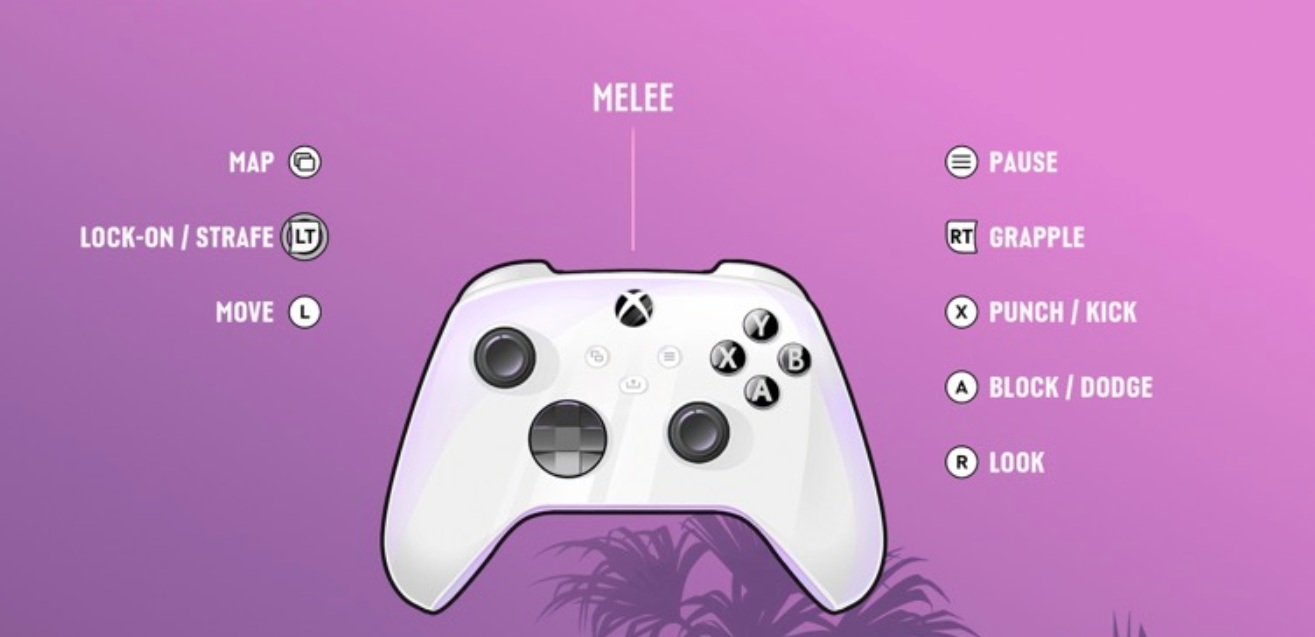
Melee

GTA 6 Controls Melee

Button

Action

Left Stick (L)

Move

Right Stick (R)

Look

LT

Lock-On / Strafe

RT

Grapple

A

Block / Dodge

X

Punch / Kick

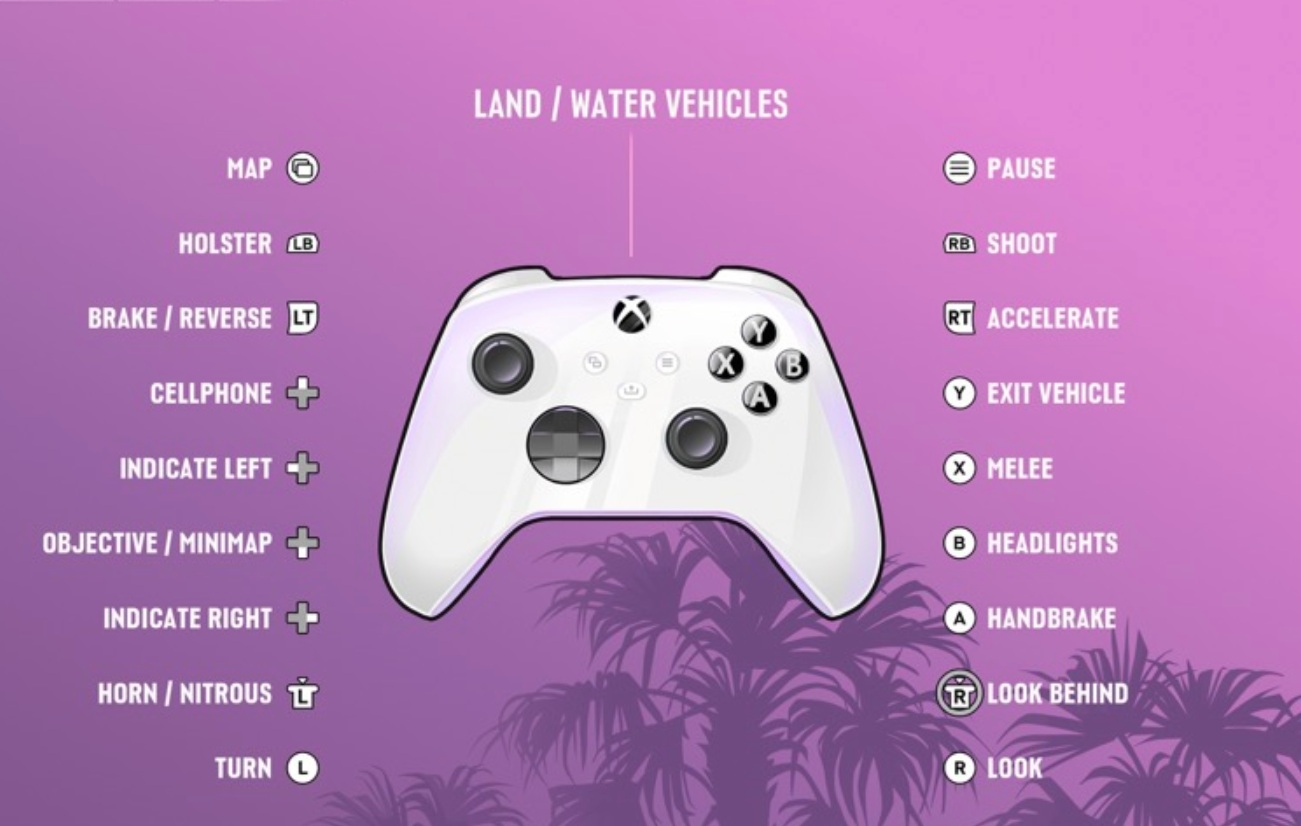
Land / Water Vehicles

GTA 6 Controls Land/Water Vehicles

Button

Action

Left Stick (L)

Turn

Right Stick (R)

Look

Left Stick Click (LS)

Horn / Nitrous

Right Stick Click (RS)

Look Behind

LB

[Hold]

Holster

[Loadout]

LT

Brake / Reverse

RB

Shoot

RT

Accelerate

Y

Enter / Exit Vehicle

X

Melee

B

[Hold]

Headlights

[Duck]

A

Handbrake

D-Pad Up

Cellphone

D-Pad Down

Objective / Minimap

D-Pad Left

[Hold]

Indicate Left

[Vehicle Menu]

D-Pad Right

Indicate Right

Driving Tips

Press A for the handbrake to slide through tight corners, and use LS for the horn or nitrous. RB lets you shoot from the vehicle, and LB holsters your weapon. Y gets you out of the vehicle. In a car, X kicks your door open to melee enemies to your side.

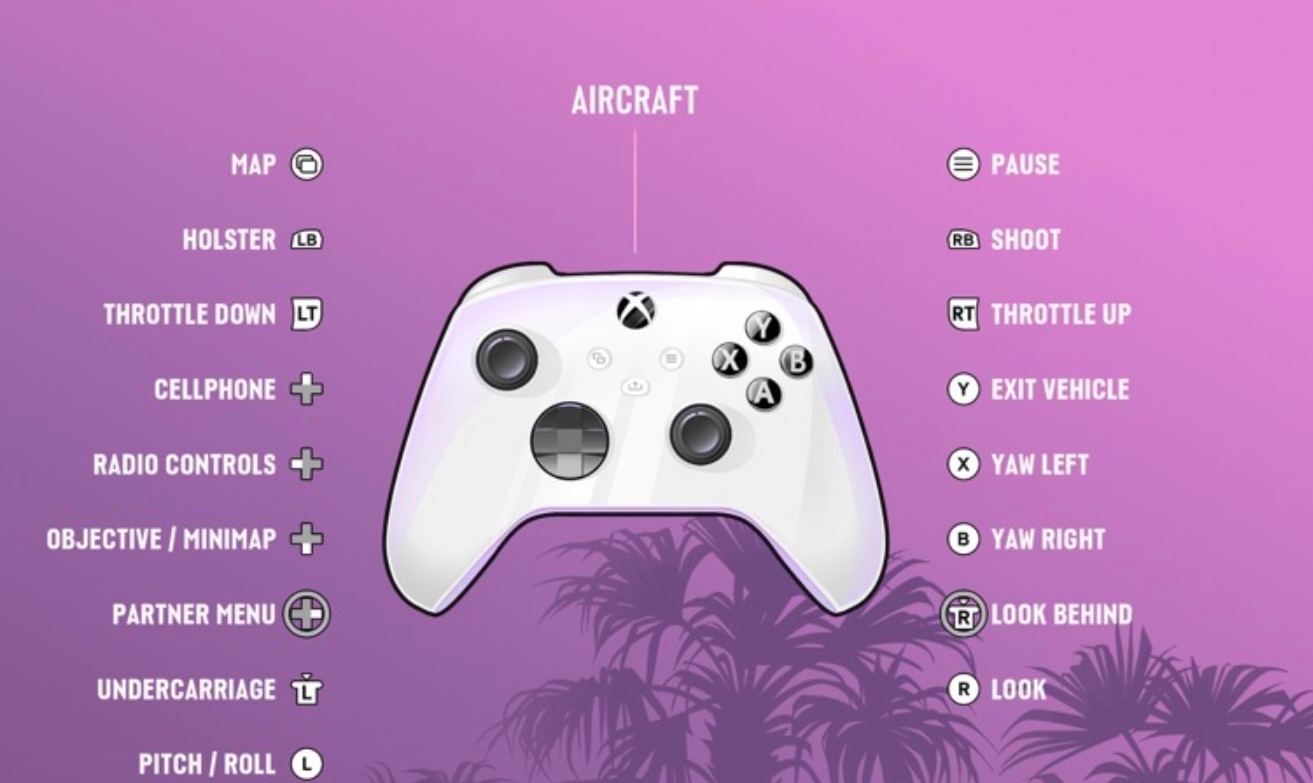
Aircraft

GTA 6 Controls Aircraft

Button

Action

Left Stick (L)

Pitch / Roll

Right Stick (R)

Look

Left Stick Click (LS)

Undercarriage

Right Stick Click (RS)

Look Behind

LB

[Hold]

Holster

[Loadout]

LT

Throttle Down

RB

Shoot

RT

Throttle Up

Y

Exit Vehicle

X

Yaw Left

B

Yaw Right

D-Pad Up

Cellphone

D-Pad Down

Objective / Minimap

D-Pad Left

[Hold]

Radio Controls

[Vehicle Menu]

D-Pad Right

Partner Menu

Flying Tips

Use RT and LT to manage your throttle, and steer pitch and roll with the Left Stick. Press X and B to yaw the aircraft left and right, and press LS to raise or lower the undercarriage. Y exits the aircraft, and RB shoots.

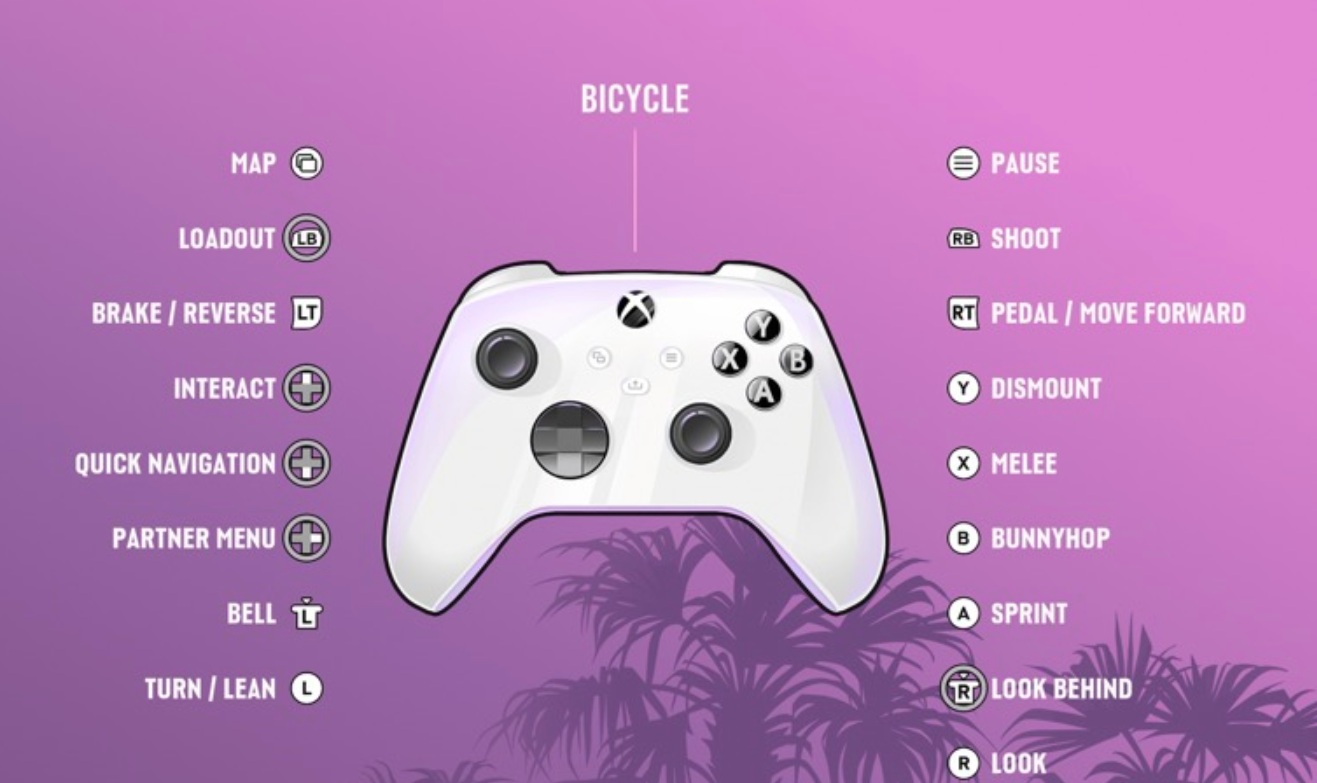
Bicycle

GTA 6 Controls Bicycle

Button

Action

Left Stick (L)

Turn / Lean

Right Stick (R)

Look

Left Stick Click (LS)

Bell

Right Stick Click (RS)

Look Behind

LB

[Hold]

Holster

[Loadout]

LT

Brake / Reverse

RB

Shoot

RT

Pedal / Move Forward

Y

Dismount

X

Melee

B

Bunnyhop

A

Sprint

D-Pad Up

[Hold]

Cellphone

[Interact]

Cycling Tips

Hold RT to pedal and tap A to sprint for a burst of speed. B performs a bunnyhop, LS rings the bell, and Y gets you off the bike. You can still shoot with RB and melee with X while riding.

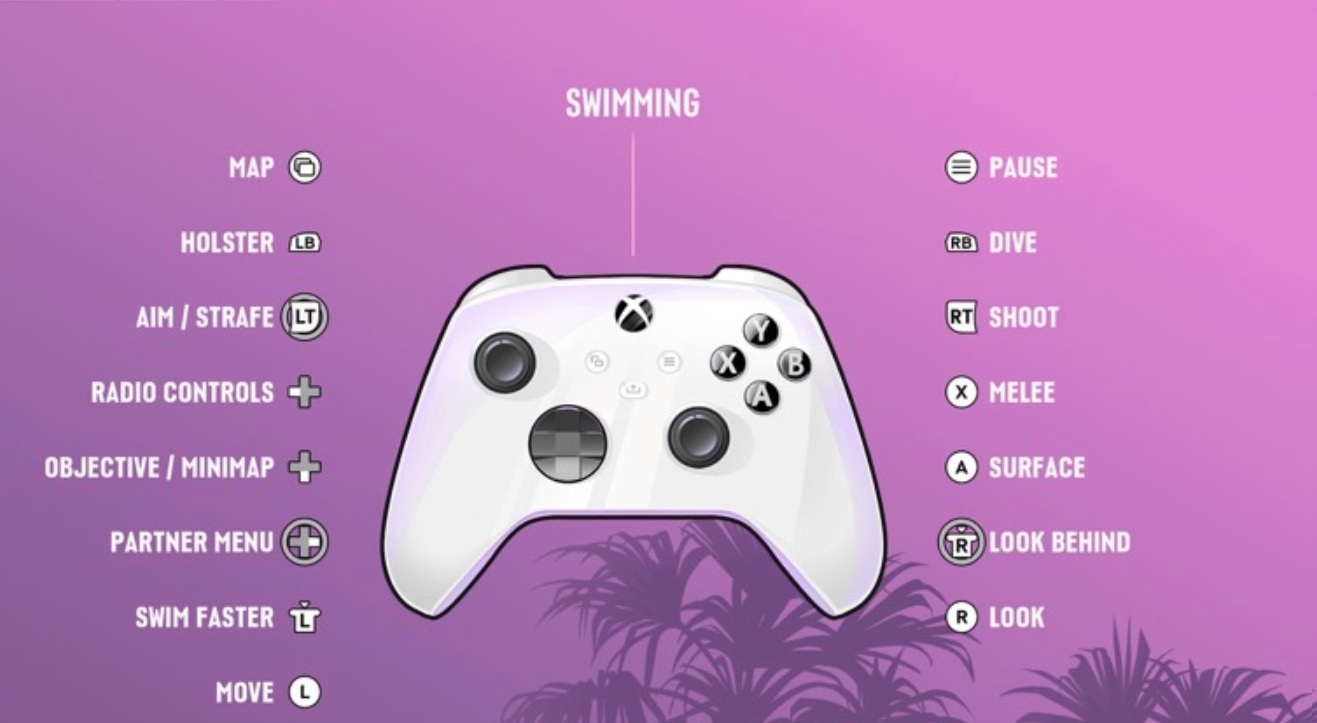
Swimming

GTA 6 Controls Swimming

Button

Action

Left Stick (L)

Move

Right Stick (R)

Look

Left Stick Click (LS)

Swim Faster

Right Stick Click (RS)

Look Behind

LB

Holster

LT

Aim / Strafe

RB

Dive

RT

Shoot

X

Melee

A

Surface

Swimming Tips

Press LS to swim faster and RB to dive underwater. When you need air, press A to surface. In water, you can still aim and strafe with LT, shoot with RT, and melee with X.

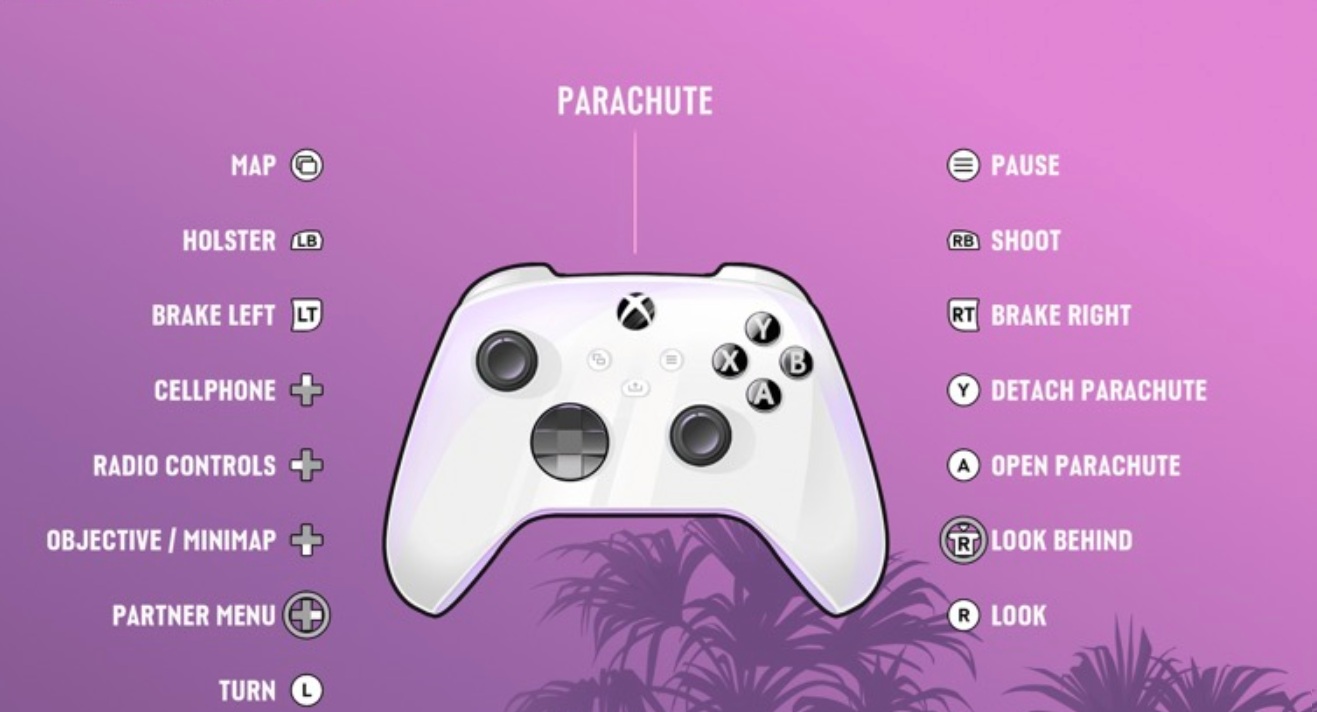
Parachute

GTA 6 Controls Parachute

In freefall, press Cross (X) to open your parachute, then steer with the Left Stick and use L2 and R2 to brake left or right.

Button

Action

Left Stick (L)

Turn

Right Stick (R)

Look

Right Stick Click (RS)

Look Behind

LB

[Hold]

Holster

[Loadout]

LT

Brake Left

RB

Shoot

RT

Brake Right

Y

Detach Parachute

A

Open Parachute

Parachute Tips

Use LT and RT to brake on either side and line up your landing. Press Y to detach the parachute once you are down or if you need to drop it. You can also shoot with RB while descending.

Comments

0

Table of Contents

See More

How to Access ALL TV Console Games in GTA 6
Updated on Nov 19, 2026
Grand Theft Auto 6 - Full Trophy List & Walkthrough
Updated on Nov 19, 2026
Pre-Load GTA 6 Now - Latest News, Release Date and More
Updated on Nov 19, 2026
GTA 6 Soundtrack: All Artists, Songs, and Radio Stations
Updated on Nov 19, 2026
GTA 6: How To Save Your Game
Updated on Nov 19, 2026

Like our guides?

Add Mobalytics as a preferred source on Google!